Using this brand new innovative system, users are able to submit appeals to their bans which the moderation team can respond to
🔍 Appeal Process Overview
Upon getting banned, users are sent a ban message with an appeal button below it.
When they press this button, they'll be invited to the Leonardo.Ai Appeals server, where they'll find only one channel with a button to appeal.
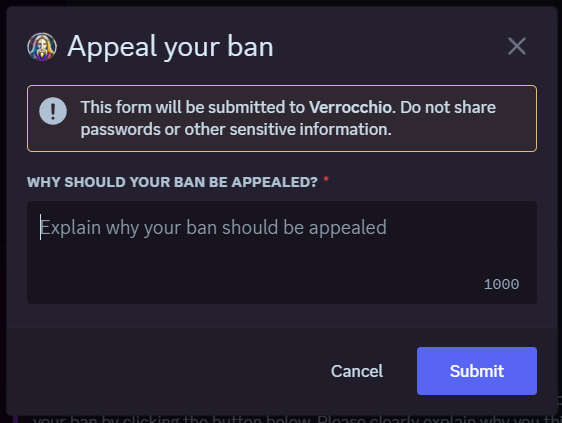
Clicking this button will cause a modal to come up, where users enter why they should be unbanned.
After submitting the appeal, it will be sent to the #🤖│verro-moderation channel on the Leonardo.Ai Discord server.
🛠️ Staff Actions on Appeal
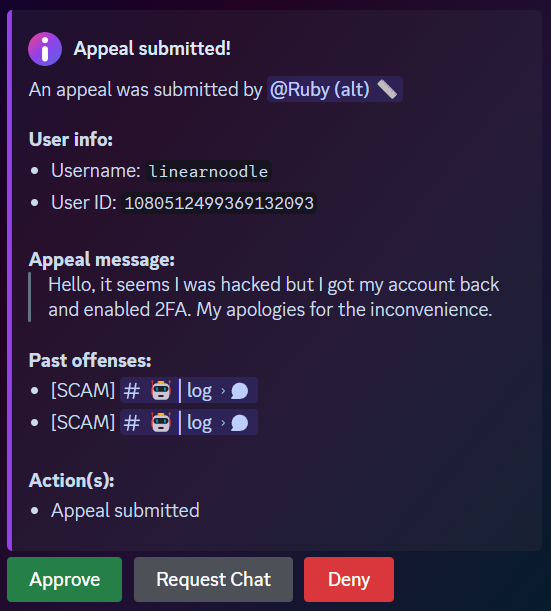
The appeal report lists past offenses of the user so staff can easily see why the user was banned, as well as their name and message.
The appeal report also has 3 buttons available: "Approve", "Deny" and "Request Chat".
💬 Request Chat
The request chat button will create a ticket in the Leonardo.Ai Appeals server, which staff and the appealing member have access to.
In this channel, staff can talk to the user about their appeal (for example, ask a hacked user to enable 2FA) before making a decision.
⚖️ Final Decision
The Approve button will kick the user from the appeal server after unbanning and DMing them.
The Deny button will ban the user from the appeal server as well.
This system ensures a smooth appeal process for both users and staff. By preventing the need of an external website or form and enabling the possibility of engaging in a conversation with the appealing user, this system is more advanced and easier to use than the appeal system of most bots.
22 July 2024
📣 Daily Missions and the Weekly Leaderboard
A chance to win platform tokens every week by being active in the community
This update brings exciting new ways to interact with the community and rank up. You can now complete daily missions to gain server exp, as well as advance on the weekly leaderboard to win tokens to generate images with on the platform!
❓ How does it work?
🕒 Every day at 00:00 UTC, a new set of missions will be available for you to complete.
👀 To check your missions, simply use the !missions command in #🤖│bot-commands.
🎁 After you complete one or more missions, use the Claim Reward button after using !missions to claim your server exp!
🏆 Completing more missions per day will increase your reward per mission!
🪙 How to win platform tokens?
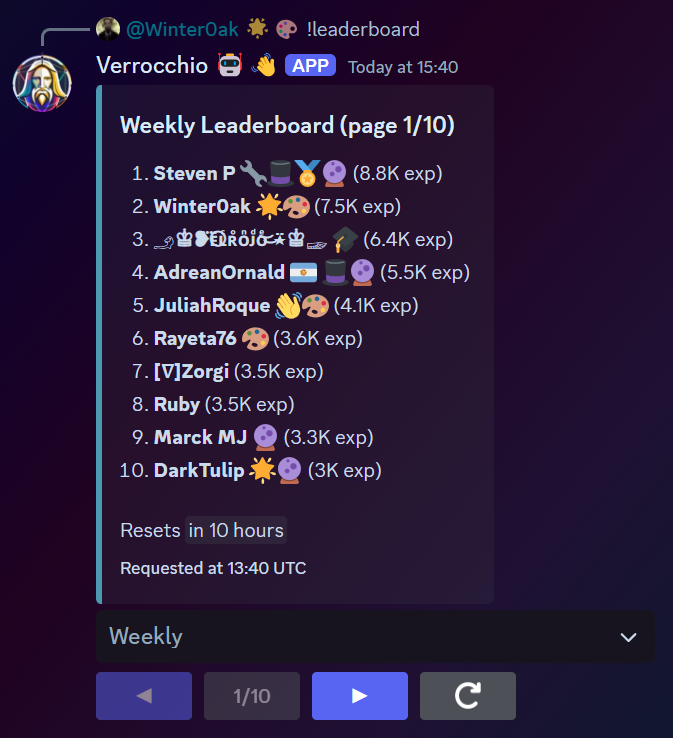
🌐 The weekly leaderboard tracks who gained the most server exp this week.
🗓️ Every week, on Monday at 00:00 UTC, the weekly leaderboard will reset.
🥇 If you are in the top 3 at the time of the reset, you can win up to 1750 tokens to generate images on the platform!
⏰ You will have a chance to win every week by being the most active that week, no matter how long you've been on the server.
🤖 Check the weekly leaderboard using the !leaderboard command in #🤖│bot-commands.
Thanks to the weekly leaderboard which resets each week, getting to the top becomes feasible for newcomers. With the chance at prizes on top of this, we hope to motivate people to compete by engaging with the community. This module is focused at bringing more activity into the #💬│general and #🖼│image-share channels, the main channels of the server, to become a more appealing server to participate in.
21 July 2024
📣 Rank cards
Easily see what rank you are with a rank card
The !rank command now sends a rank card image instead of an embed.
You can now easily see when you'll level up thanks to the progress bar.
The background image is different for each rank, getting more and more complex as you rank up.
In the top right corner of the badge is your position on the all-time leaderboard.
Below the bottom bar are the badges a user has, which are tied to their roles and managed by the badges module.
15 May 2024
🛠️ Introducing AI Automoderation
Our innovative AI automoderation system detects messages and allows staff to handle them efficiently
🔍 Message Detection
The system automatically detects messages that are deemed rulebreaking.
Messages containing scams, hate speech, NSFW content, and more are flagged.
Detection includes phishing attempts, mass pings, and personal information sharing.
Based on the category, Verrocchio takes different actions such as deleting the message and sending a warning.
The most severe action Verrocchio takes on its own is timing the user out (in case of hate speech, scams, etc.) so a moderator has time to review the situation.
Verrocchio can also modify rulebreaking nicknames. In this case it modifies the nickname to a variant of the name that doesn't break rules anymore.
Scams are added to a registry which is used to instantly delete any known scams without having to scan the messages again.
🛠️ Staff Actions on Detected Messages
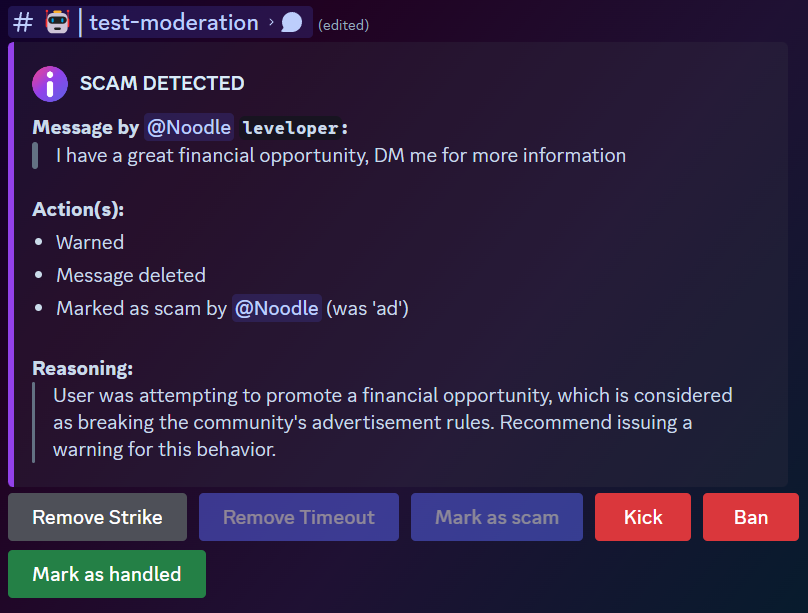
Staff can see a detailed report of the detected message and the content of the message.
The report provides several buttons to handle the situation, such as 'Remove Timeout', 'Kick' and 'Ban'.
Sometimes, a scam message might be improperly flagged by Verrocchio as NSFW or another category. In this case a moderator can mark it as a scam so it still gets added to the detected scams list.
All actions taken are shown in the report, including the name of the moderator who executed them.
Once a moderator handled the report, they can mark the report as handled upon which it will be closed and the buttons will be removed.
This module ensures any rulebreaking messages by newcomers (who are responsible for almost all rulebreaking messages) are instantly dealt with, to avoid inconveniencing the community. It is extremely effective and lets virtually nothing through, making moderation much more efficient.

 🔍 Appeal Process Overview
 The appeal report lists past offenses of the user so staff can easily see why the user was banned, as well as their name and message.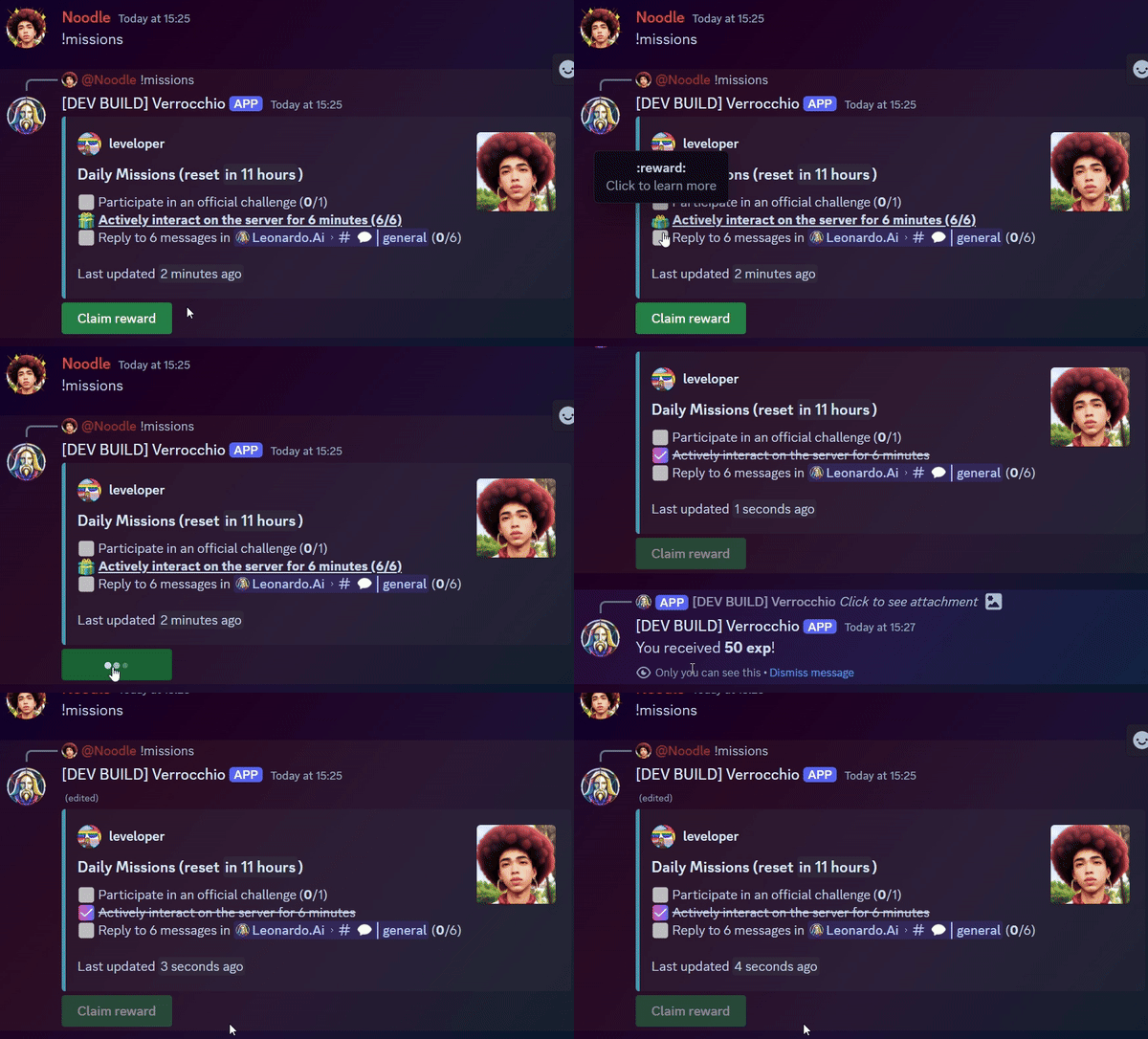
 🪙 How to win platform tokens?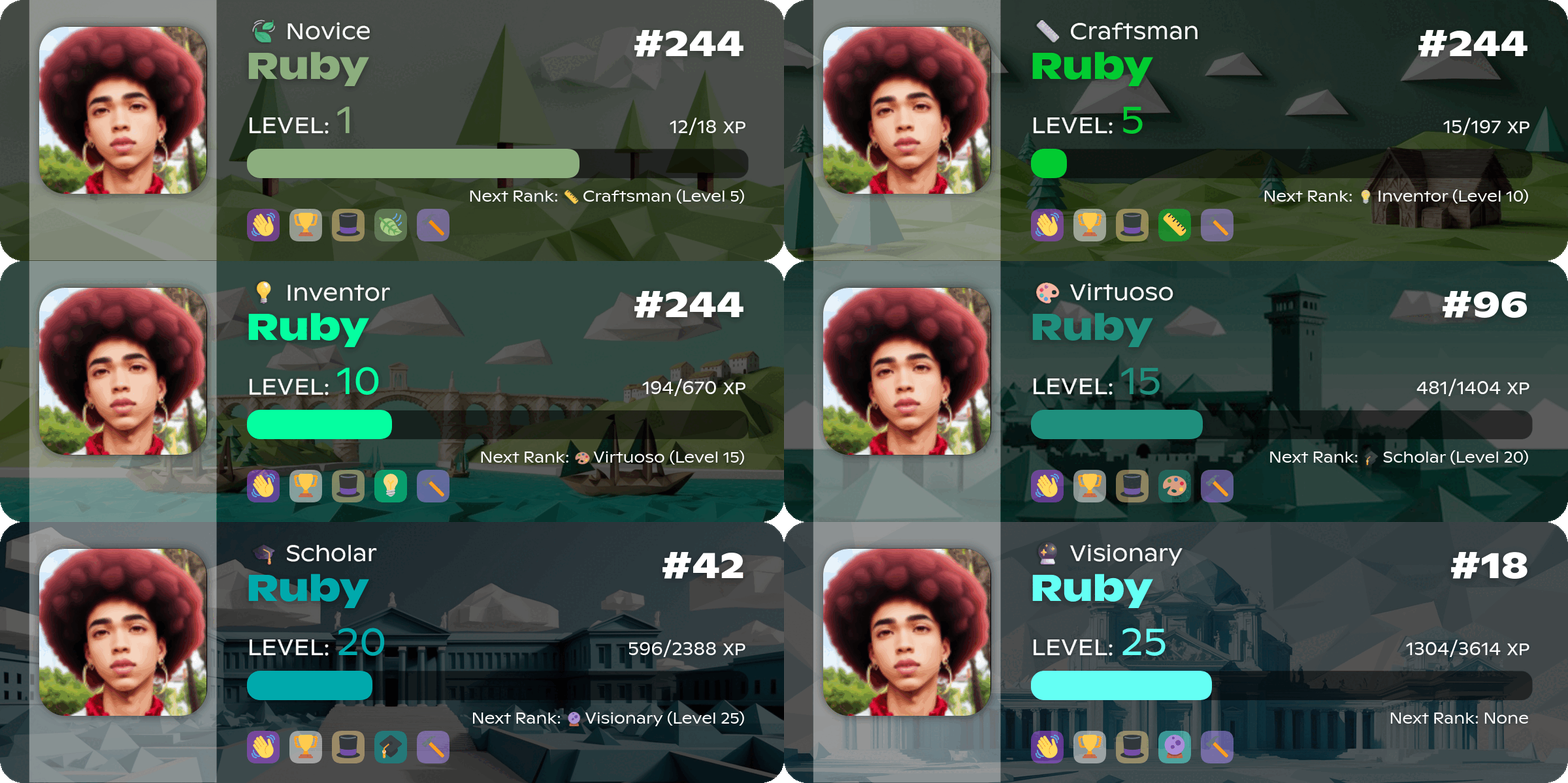
 Staff can see a detailed report of the detected message and the content of the message.